Directories
Whenever you search a user on XiVO using any of its Web Apps or a registered phone, it uses the module Dird to query sources named Directories. If you have a custom source, such as a LDAP, that you would like XiVO to know about and rely on, you must first register it as a Directory. Then you must write the right configuration, so XiVO is able to query it and render the right informations from it.
These are the steps to do so:
There are 5 different Directory Types, each having some specific configurations. You will find some exampes in those pages, but you must follow the procedure here.
Note
Phone IP should be in the authorized subnet to access the directories. See Remote directory.
I. Add a Directory
You define where the data source that will become a Directory is located and what is its type.
Default configuration
In :
Directory name: the directory name
Type: select among:
URI: the data source location
Description: (optional) a description of the directory
Warning
Editing the URI later requires you to save again the Directory Definition because the corresponding URI on Definition will be broken. After that you shall restart Dird
LDAPs (specific)
II. Add a Directory Definition
Under Definition, you define:
the Directory Source Name
the Directory Fields that will be used for the search. Directory Fields are values that shall be available on the source. See below Which Directory Fields to use?.
the mapping between the Directory Fields and a the DisplayFilter Fields (see Display Filter)
In :
Name: the Directory Source Name
URI: the data source, one linked to the Directory you defined above will appear
Delimiter: (optional) the field delimiter in the data source
Direct match: the list used to match entries for direct lookup (comma separated) - see Which Directory Fields to use?
Match reverse directories: (optional) the list used to match entries for reverse lookup (comma separated) - see Reverse lookup and Which Directory Fields to use?
Mapped fields: the mapping between your Directory Fields and the DisplayFilter Fields
Fieldname: your Directory Fields (the values you want to read from it)
Value: the associated DisplayFilter Fields
Important
The Directory Source Name cannot contain special characters, use a-z, A-Z, 0-9
Which Directory Fields to use?
The values in Direct match, Match reverse directories and Mapped fields are fields of the source, so they depend on the Directory Types:
XiVO: for Mapped fields: only Mappable fields, otherwise the wider Searchable fields
Phonebook: dotted names such as
phonebook.displaynameorphonebooknumber.office.numberCSV File: the column names of your CSV file
CSV Web service: the fields contained in the CSV result
LDAP: the attribute names of your LDAP server, such as
cn
III. Register the Directory
Your Directory is defined but not activated. It has to be selected, through its Directory Source Name, for direct search and/or for reverse lookup.
Register Directory for direct search
In .
Edit your context (usually default)
Select your display filter (usually Display, see Display Filter)
Add the directories in the Directories section.
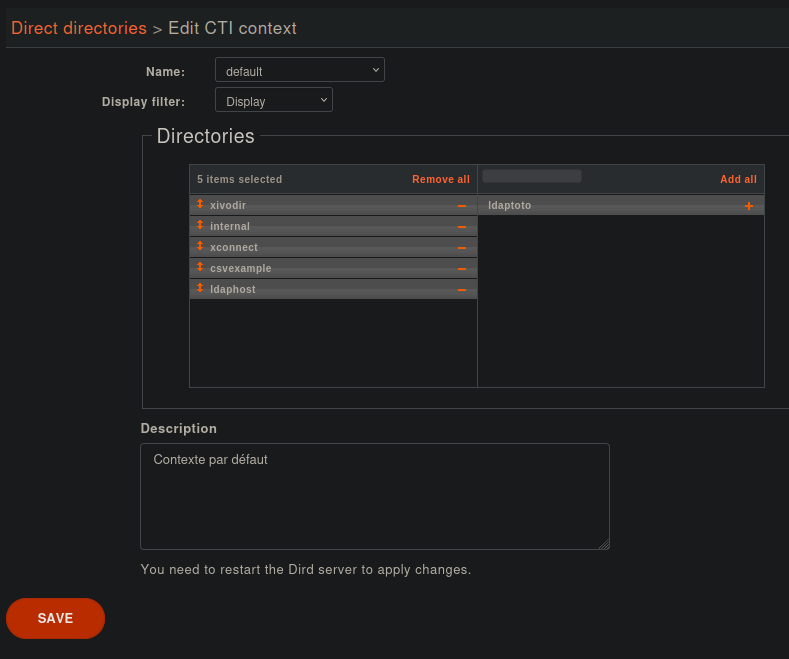
Register Directory for reverse lookup
See Reverse lookup to configure the directory for reverse lookup.
In .
Add the directories to include to reverse lookups in the Related directories section.
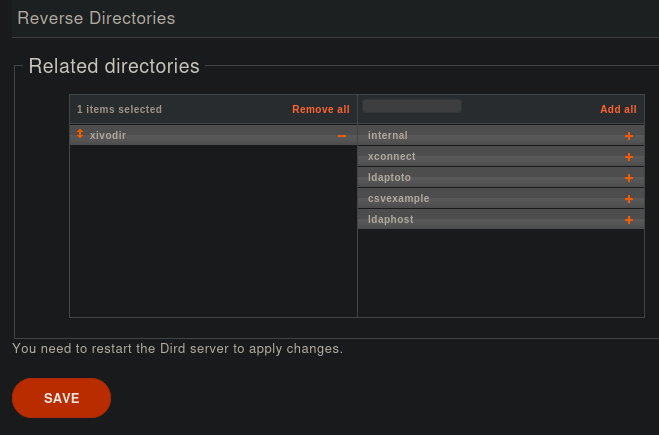
IV. Restart Dird
Use one ofthese methods:
console
service xivo-dird restarton XiVO PBX
You may want to follow closely Dird logs there, so you are sure no Directory fails to reload.
Directory Types
Display Filter
Location
Default
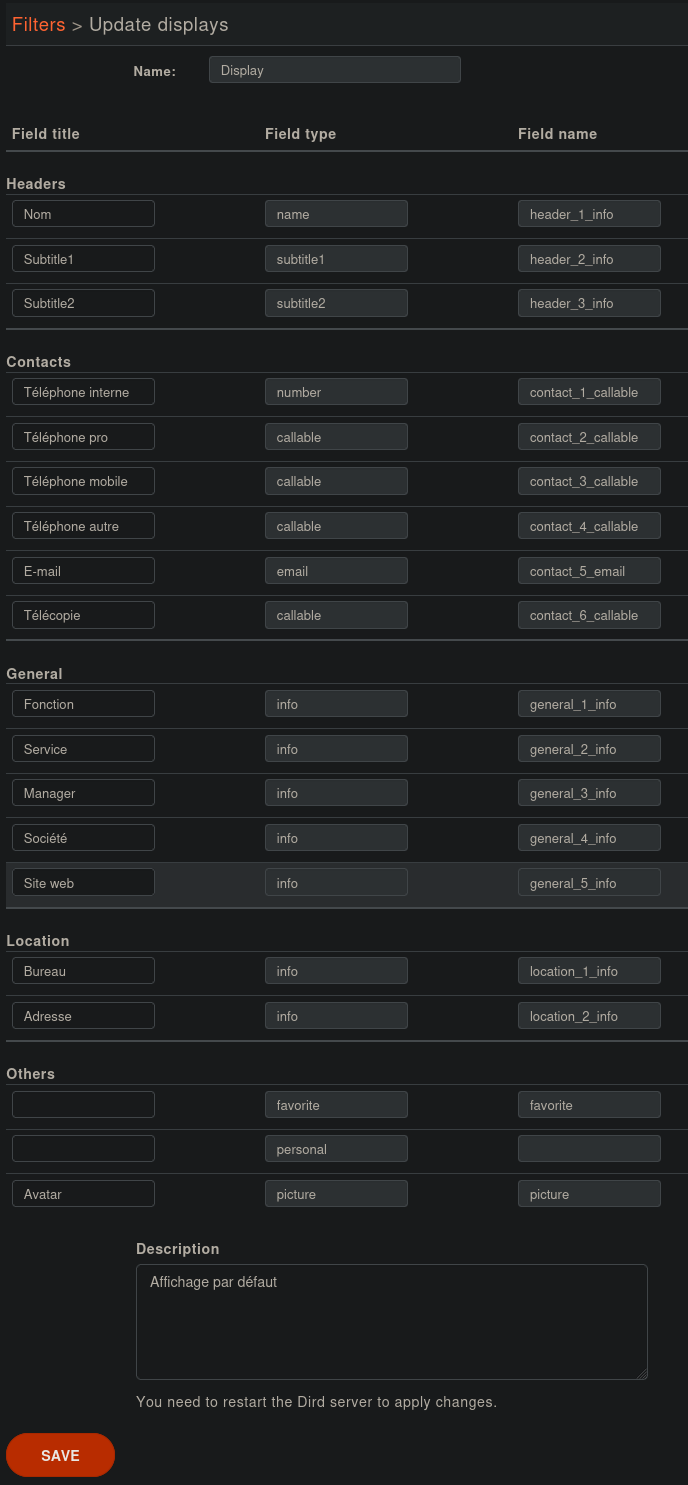
Attributes
Each line in the display filter will result in a header in your Web Apps.
Field title: text displayed in the header.
Field type: type of the column, this information is used by the Web Apps. (see type description)
Field name: names of the variables to map in Directory Definitions to Directory Fields reverse_lookup
Directories by labels
This feature restricts which directories a user can search, based on their User Labels. When a user searches, only the directories mapped to one of their labels are queried. This applies to searches made from the UC Assistant and to searches made from a provisioned deskphone (see Searched directories).
Search behaviour
A user only gets results from directories mapped to one of their labels.
If several of the user’s labels map to different directories, all matching directories are queried: duplicate sources are removed.
Users with no label, or only labels that are not mapped to any directory, fall back to the Default Directories.
Configuration
Go to .
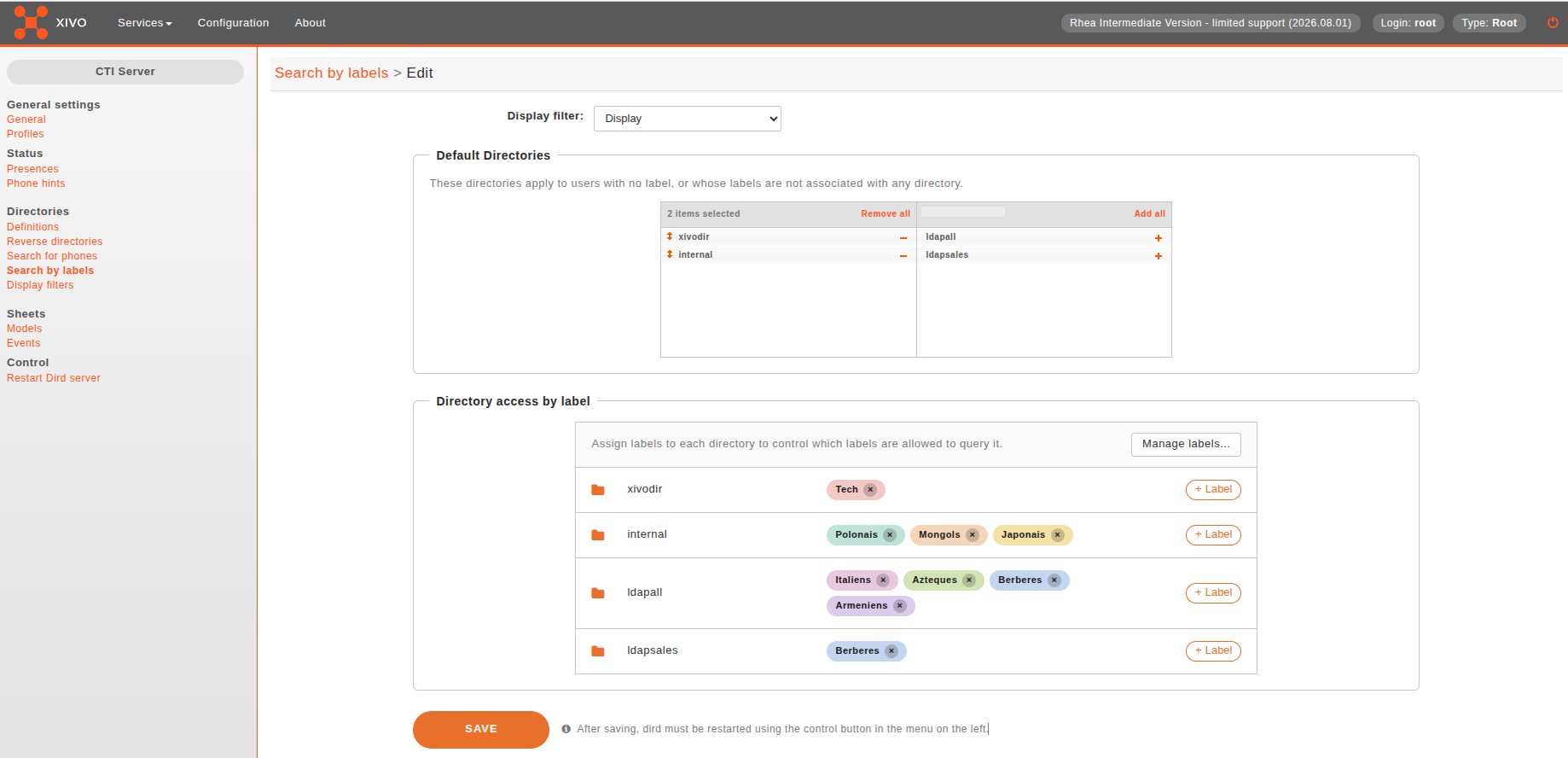
The page has three settings:
Display filter: the display filter applied to the results.
Default Directories: directories queried for users with no (or unmapped) label.
Directory access by label: associates directories with the labels allowed to search them. Users can search a directory only if they have one of the labels mapped to it.
To map labels to a directory:
On the directory’s row, click + Label to open the label picker (type to filter the list).
Click the labels to assign. Each keeps a consistent colour; remove one with the x on its chip.
Click Save.
Manage labels and assign them to users from the User Labels page (Manage labels…).
Important
Changes only take effect after Dird is restarted, see IV. Restart Dird.
Reverse lookup
Reverse lookup aims to show a better caller ID name on incoming calls when the caller is in one of our directories, based on the incoming caller ID number.
It will only be tried if at least one of the following conditions is true:
The caller ID name is the same as the caller ID number
The caller ID name is “unknown”
Important
Reverse lookup is performed after Caller Number Normalization (since XiVO 13.11).
To enable reverse lookup for a directory, you need to add in its definition ():
a columns list in Match reverse directories where the incoming caller ID number is searched
an entry in Mapped fields with:
Fieldname:
reverseValue: how you want the caller ID name to be displayed (for instance
{phonebooknumber.society})
Warning
When you update this, xivo-dird must be restarted, see IV. Restart Dird.
Important
The directory must also be added as Reverse Lookup Directory, see Register Directory for reverse lookup.
Example
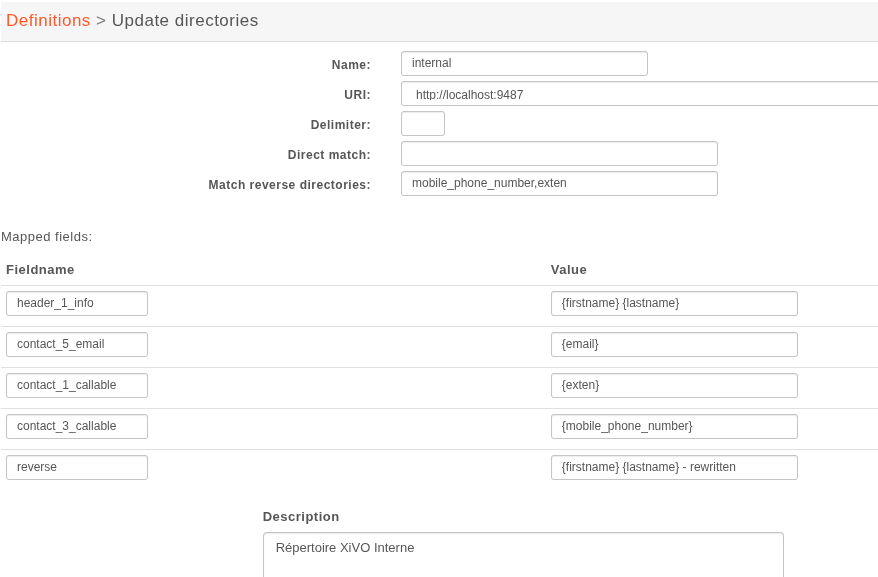
For internal directory:
Match reverse directories:
mobile_phone_number,extenFieldname:
reverseValue:
{firstname} {lastname} - rewritten
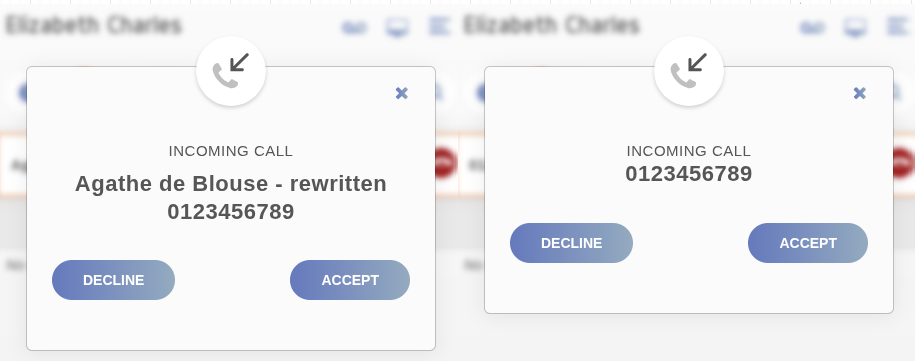
This configuration will show the contact’s firstname, lastname then - rewritten on the caller ID name, when the incoming call callerid number will match its mobile or default number.
This makes the following difference:
Merge Contacts
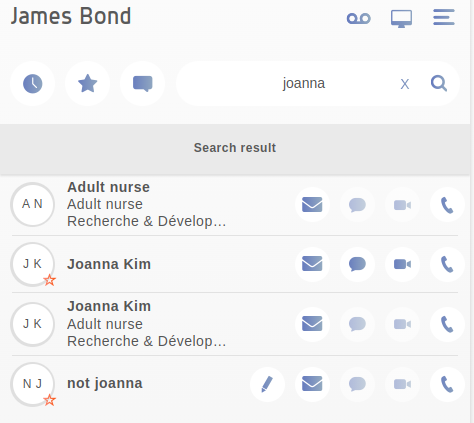
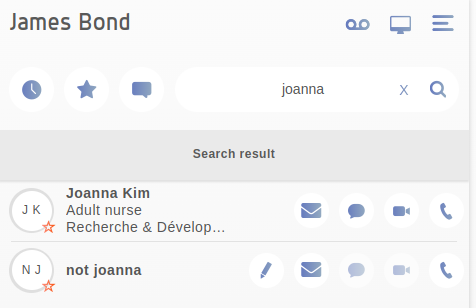
Given you have several different registered Directories containing users having common emails.
Given those Directories have for Directory Source Name: internal, ldap1, phonebook, CsvFileOne
Define the Merge Order in xivocc’s custom.env with
DIRECTORY_SOURCES_PRIORITYand the sources you want to merge, separated by,:
DIRECTORY_SOURCES_PRIORITY="ldap1,internal,phonebook"
DIRECTORY_INTERNAL_SOURCE applies a different order for merging the phone (precisely contact_1_callable according to the default Display).DIRECTORY_INTERNAL_SOURCE="internal,phonebook"
DIRECTORY_INTERNAL_SOURCEcan only contain members ofDIRECTORY_SOURCES_PRIORITY. Any other member won’t be read.DIRECTORY_INTERNAL_SOURCEmerging happen after theDIRECTORY_SOURCES_PRIORITYmerging, updating the object.
Important
If DIRECTORY_SOURCES_PRIORITY is not provided nothing is done. Duplicates are then maintained.
Important
If a Source provides several times a contact with the same email (for instance several people use a service email), then these won’t be merged.
Important
The merge contact is case insenstive with mails. The case sensitivity can be restablished by adding the following key to xivocc’s custom.env: MERGE_CONTACTS_CASE_SENSITIVITY=true
Important
You need to restart XUC for this configuration to apply: xivocc-dcomp up -d xuc
Warning
The merge appears only on xivo-dird results. If the search term does not lead xivo-dird to retrieve all contacts you want to merge, the merge will be uncomplete. An example of this will be searching contacts by service name, where most likely, only the ldap entries will be found by xivo-dird and not be mergeable with their internal counterpart.