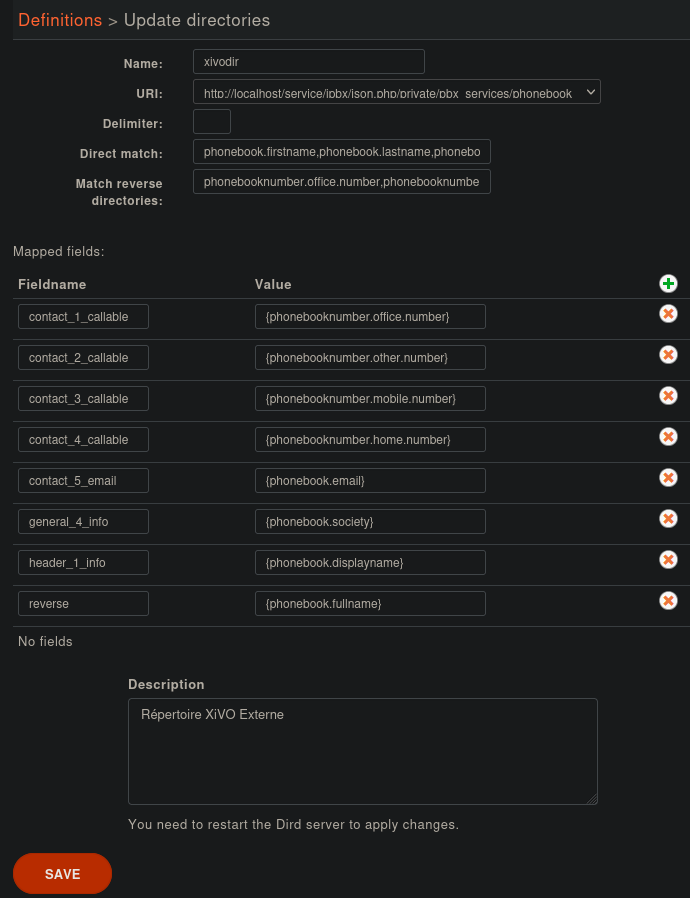
Phonebook directories
This type of directory source is the internal phonebook of a XiVO. The URI field is the one used to query the phonebook.
This directory type matches the phonebook backend in xivo-dird.
Available fields
General phone book section
These fields are set in the General tab of the phone book.
phonebook.description
phonebook.displayname
phonebook.email
phonebook.firstname
phonebook.fullname
phonebook.lastname
phonebook.society
phonebook.title
phonebook.url
Important
phonebook.fullname is automatically generated as “<firstname> <lastname>”, e.g. “John Doe” unless neither is found then it fallbacks to phonebook.displayname We recommend to stop using phonebook.fullname and use phonebook.displayname, which is always provided, instead.
Phone numbers
These are the different phone numbers that are available
phonebooknumber.fax.number
phonebooknumber.home.number
phonebooknumber.mobile.number
phonebooknumber.office.number
phonebooknumber.other.number
Addresses
Each configured address can be accessed
Address uses the following syntax phonebookaddress.[location].[field], e.g. phonebookaddress.office.zipcode.
Locations
home
office
other
Fields
address1
address2
city
country
state
zipcode
Example
Adding a source
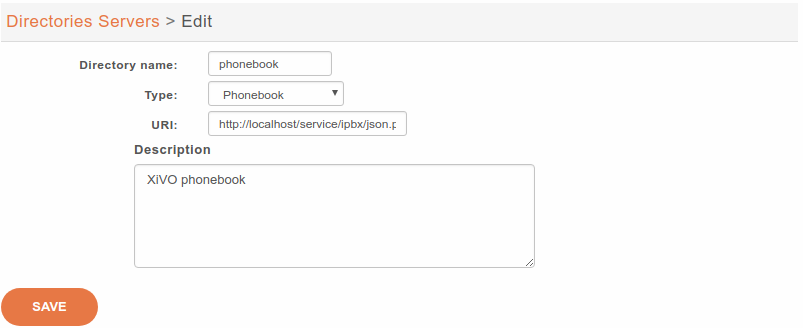
URI : http://localhost/service/ipbx/json.php/private/pbx_services/phonebook
Configuring source access
Default phonebook is set in .
Important
New in Maia (2024.05), xivodir update to match the Display Filters evolution. You may clear the remaining values from the previous default phonebook or adapt them if you implemented specific usage for them.