CSV File Directory
The source file of the directory must be in CSV format.
This directory type matches the csv backend in xivo-dird.
Available fields
Available fields are the column names from your CSV file.
Example
csv-source.csv:
title|firstname|lastname|displayname|society|phone|email
mr|Emmett|Brown|Brown Emmett|DMC|5555551234|emmet.brown@dmc.example.com
ms|Alice|Wonderland|Wonderland Alice|DMC|5555551235|alice.wonderland@dmc.example.com
Adding Directory
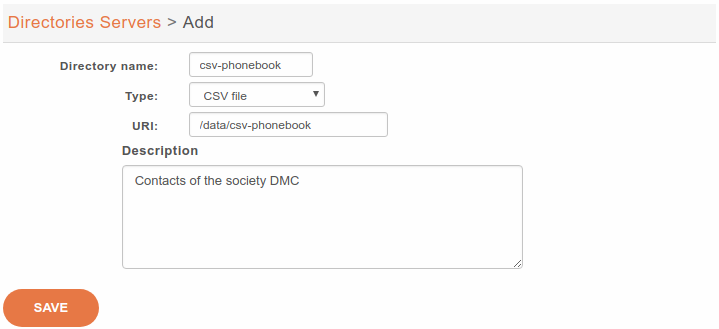
By default, Dird looks for the file in XiVO PBX.
It’s the absolute file path you must register in URI
You must explicitely write the extension .csv
If the Directory fails to appear after step IV. Restart Dird, you might find corresponding information in dird logs
2024-12-10 22:37:59,646 [817094] (ERROR) (xivo_dird.plugins.csv_plugin): Could not load CSV file content
Traceback (most recent call last):
File "/usr/lib/python3/dist-packages/xivo_dird/plugins/csv_plugin.py", line 91, in _load_file
with open(filename, 'r') as f:
      ^^^^^^^^^^^^^^^^^^^
FileNotFoundError: [Errno 2] No such file or directory: '/data/csv-source'
Adding Directory Definition
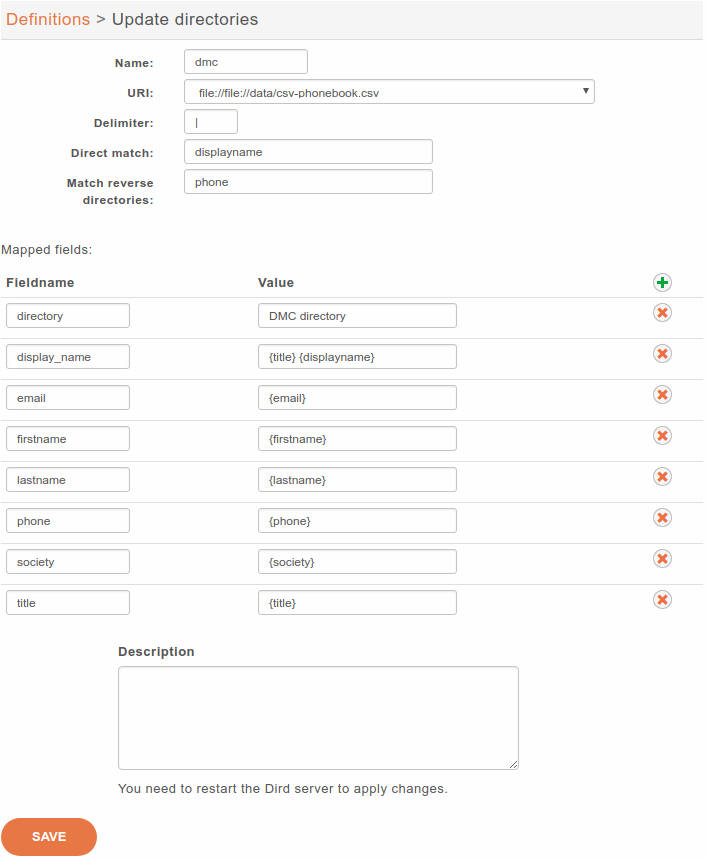
The Delimiter must be the separator you use in the CSV (| in the example but it may be another character like ,)