Resilience Architecture
The Resilience solution in XiVO makes it possible to maintain basic telephony function whether your main XiVO server is running or not. When running a XiVO HA cluster, users are guaranteed to never experience a downtime of more than 5 minutes of their basic telephony service.
The Resilience solution in XiVO is based on a 2-nodes “main and standby” architecture. In the normal situation, both the main and standby nodes are running in parallel, the standby acting as a “hot standby”, and all the telephony services are provided by the main node. If the main fails or must be shutdown for maintenance, then the standby node automatically takes over the telephony services. Supported telephony devices automatically communicate with the standby node instead of the main one. Once the main is up again, the standby node stops itself and the telephony devices failback to the main node.
Currently, resilience is supported with:
XIVO deployment
CC deployment
XDS deployment
Prerequisites
Phones must be able to reach the main and the standby
Main and Standby nodes must be in the same subnet
If firewalling, the main must be allowed to join the standby on ports 22 and 5432
If firewalling, the standby must be allowed to join the main with an ICMP ping
Trunk registration timeout (
expiry) should be less than 300 seconds (5 minutes)The standby must have no provisioning plugins installed.
The Resilience solution is guaranteed to work correctly with the following devices.
Failover Mode
Resilience comes in two failover mode, automatic or manual.
Automatic Failover
Note
Refer to Administration in Automatic Failover Mode for more information
When chosing to operate in Automatic failover mode:
Standby XiVO will actively ping the Main XiVO
if Standby XiVO cannot ping Main XiVO, it will automatically activate and start the services
when Standby XiVO correctly ping Main XiVO, it will automatically disable and stop the services
Manual Failover
Note
Refer to Administration in Manual Failover Mode for more information
When chosing to operate in Manual failover mode:
there is no heartbeat between Standby and Main XiVO
the failover must be triggered by an admin via the Web interface
Resilience in XiVO deployement
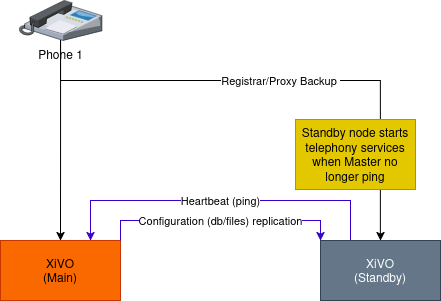
In a simple XiVO deployment another XiVO is added in standby mode.
In standby mode the XiVO ping the main XiVO every minutes.
if the ping succeeds (main is up): the standby XiVO shutdown the telephony services
if more than 3 ping fails (main is down): the standby XiVO startup the telephony services
Resilience in CC deployement
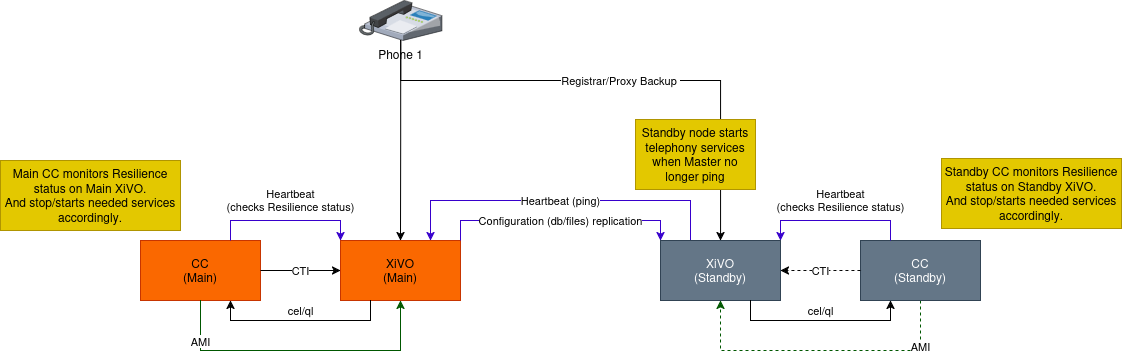
In a CC deployment another CC is configured with the standby XiVO.
The standby CC is up and running.
Resilience in XDS deployement
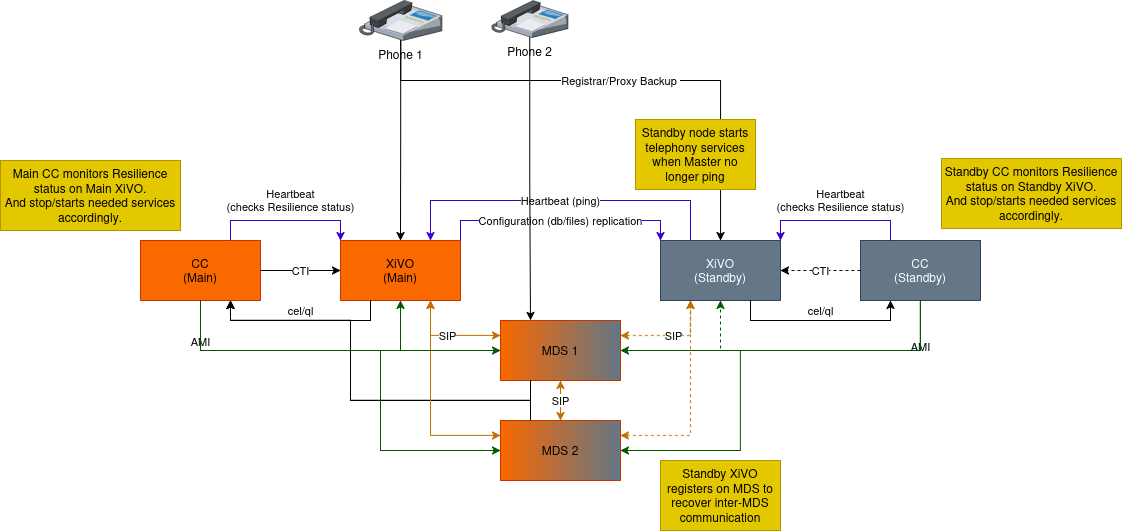
In an XDS deployment no other node is added.
MDS will be shared between the main and the standby XiVO.
When the standby starts the telephony services, it will register the inter-mds trunk with the other MDS so the inter-MDS call can work.
Resilience with Edge deployement
Note
Resilience can work with single Edge deployment
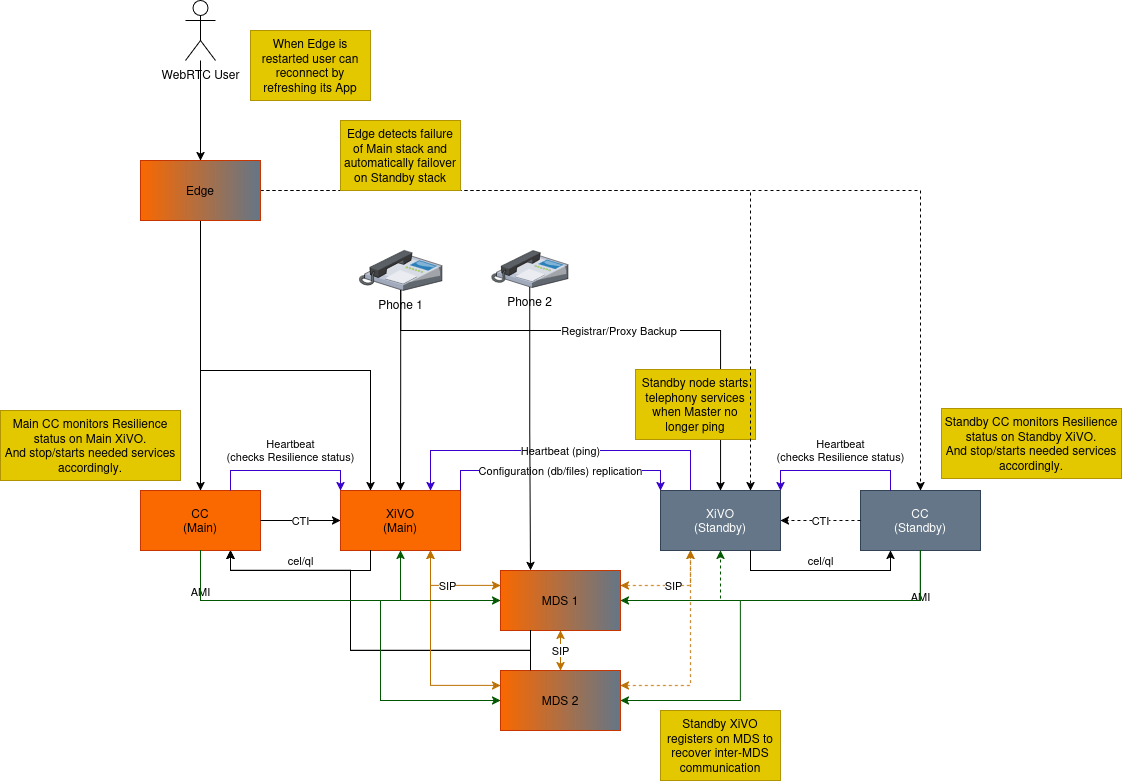
Edge must know where the CC and the XiVO are located. Therefore a reconfiguration of the Edge is needed when standby takeover.
XiVO and CC standby must be configured with Edge information (mainly TURN secret).
Replication
Once main standby configuration is completed, XiVO configuration (DB and files) is replicated from the main node to the standby every hour (:00).
DB Replication
The replication does not copy the full XiVO configuration of the main. Notably, these are excluded:
All the network configuration except DHCP configuration (i.e. everything under the sections)
All the support configuration (i.e. everything under the section)
Resilience settings
Access Web Services configuration
Provisioning configuration
Voicemail messages
These event data are also excluded:
Queue logs
CELs
File Replication
The following directories will then be rsync’ed every hour:
/etc/asterisk/extensions_extra.d
/etc/xivo/asterisk
/var/lib/asterisk/agi-bin
/var/lib/asterisk/moh
/var/lib/xivo/certificates
/var/lib/xivo/sounds/acd
/var/lib/xivo/sounds/playback
Limitations
Architecture:
Since DHCP parameters are replicated, Main and Standby node MUST be on the same VoIP network.
When the main node is down, some features are not available and some behave a bit differently. This includes:
Call history / call records are not recorded.
Voicemail messages saved on the main node are not available.
Custom voicemail greetings recorded on the main node are not available.
Phone provisioning is disabled, i.e. a phone will always keep the same configuration, even after restarting it.
Phone remote directory is not accessible, because provisioned IP address points to the main.
Note that, on failover and on failback:
DND, call forwards, call filtering, …, statuses may be lost if changed recently.
If you are connected as an agent, then you might need to reconnect as an agent when the main goes down. Since it’s hard to know when the main goes down, if your CTI client disconnects and you can’t reconnect it, then it’s a sign the main might be down.
Additionally, only on failback:
Voicemail messages are not copied from the standby to the main, i.e. if someone left a message on your voicemail when the main was down, you won’t be able to consult it once the main is up again.
More generally, custom sounds are not copied back. This includes recordings.
Here’s the list of limitations that are more relevant on an administrator standpoint:
The main status is up or down, there’s no middle status. This mean that if Asterisk is crashed the XiVO is still up and the failover will NOT happen.