Upgrading XDS
Overview
Upgrading an XDS implies upgrading all its components, in this order:
the XiVO Main (see XiVO Main Upgrade),
the XiVO CC (see Upgrade),
then each Media Server (see Media Server Upgrade).
Important
A Media Server must be upgraded after the XiVO Main. mds-upgrade refuses to
run against a XiVO Main that is not upgraded yet, see Upgrade Order Guard.
The upgrades are sequential: do not run mds-upgrade while xivo-upgrade is still
running on the XiVO Main. Wait for xivo-upgrade to finish. The order guard only compares
schema revisions: it does not detect a XiVO Main upgrade still in progress.
The Media Servers do not have to be stopped for the XiVO Main to be upgraded: they keep serving
calls. When the upgrade changes the database, xivo-upgrade detaches the database replication:
each Media Server then runs on a frozen replica of the XiVO Main database and is upgraded later, on
its own, during a short downtime. When the upgrade leaves the database unchanged, as bugfix
upgrades within an LTS do, the Media Servers keep their replication and their database, see
Database Replication During the Upgrade.
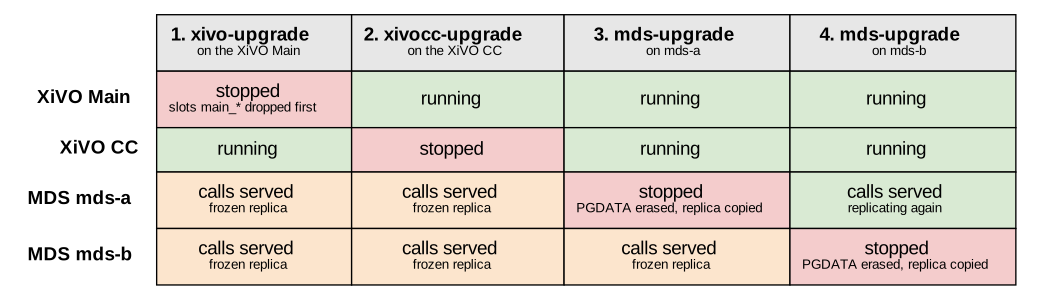
State of each server during an XDS upgrade that changes the database, with two Media Servers
The downtime of a Media Server is limited to its own upgrade. The Media Servers may be upgraded all at once, for the shortest maintenance window, or one after the other, so that the ones not upgraded yet keep serving calls.
Stopping a Media Server is supported at any point – it only extends its downtime. When the
replication is detached, its replication slot is dropped by xivo-upgrade whether it is running
or not.
Warning
Between the detachment and its own upgrade, a detached Media Server does not receive any configuration change made on the XiVO Main: its replica is frozen. Do not delay the upgrade of detached Media Servers beyond the maintenance window.
Before asking for confirmation, xivo-upgrade, mds-upgrade and mds-resync-db also show
the statistics not sent to the XiVO CC yet, see Statistics Replication Check.
Database Replication During the Upgrade
Each Media Server holds a replica of the XiVO Main database, fed by a PostgreSQL logical
replication subscription. It owns a subscription main_<MDS_NAME>, and a replication slot of the
same name on the XiVO Main.
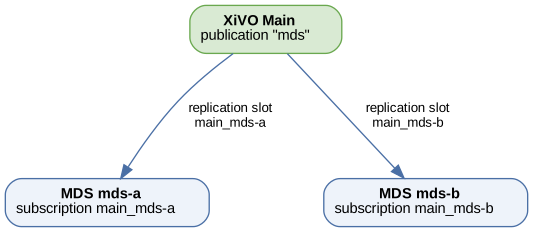
Replication slots and subscriptions between the XiVO Main and its Media Servers
Before asking for confirmation, xivo-upgrade compares the database of the XiVO Main with the
one of the target version: the schema revision and the PostgreSQL major version. It shows its
decision in the upgrade summary:
Both are unchanged: the slots are kept. The Media Servers keep serving calls while the XiVO Main is upgraded, catch up with it as soon as its database is back, and
mds-upgradekeeps their database. They can be upgraded later, whenever convenient.Either changes, or cannot be compared: the Media Servers are detached.
xivo-upgradedrops the slots at the beginning of the upgrade, before any service is stopped, which allows the Media Servers to keep running on a frozen replica.mds-upgradethen rebuilds their database, see Database Kept or Rebuilt.
Detached Media Servers log replication errors until their upgrade, since the slot they subscribe to
no longer exists. This is expected: the subscription is recreated from scratch by mds-upgrade.
Note
xivo-upgrade aborts when a slot survives the detachment, because a surviving slot
could fill up the filesystem of the XiVO Main during the upgrade. See
Troubleshooting.
XiVO Main Upgrade
Perform the upgrade as documented in the Upgrade section. The Media Servers need no
preparation: xivo-upgrade decides by itself whether to detach their replication, and tells it
before asking for confirmation. It shows no decision when the XiVO Main has no replication slot,
that is when it has no Media Server or when they are all already detached.
At the end of the upgrade, xivo-upgrade reminds you which Media Servers are detached, run on a
frozen replica and have to be upgraded.
XiVO CC Upgrade
Upgrade the XiVO CC as documented in the Upgrade section, before upgrading the Media Servers.
Media Server Upgrade
Important
This procedure must be done on all Media Servers belonging to the upgraded XDS.
The XiVO Main and the XiVO CC must be fully upgraded first.
Run the following commands on a shell prompt on each Media Server:
Switch version using the
xivo-distutility and specifying the LTS or specific version you want to upgrade to. For example:xivo-dist xivo-rhea
Launch the upgrade process. All services of this Media Server will be stopped during the process, the other Media Servers keep serving calls:
mds-upgrade
Update the monitoring configuration by launching the script:
xivo-monitoring-update-mds
Database Kept or Rebuilt
Before asking for confirmation, mds-upgrade tells whether it keeps or rebuilds the Media Server
database. It keeps it when its subscription to the XiVO Main is enabled and running, its
replication slot still exists on the XiVO Main, every table is synchronized, and the target
version changes neither the schema revision nor the PostgreSQL major version. The db container
is then only recreated with the new image.
Otherwise, mds-upgrade rebuilds the database by calling
mds-resync-db. The PostgreSQL data directory is erased and the db
container recreates the whole cluster at the target schema, subscription included, then copies the
data from the XiVO Main.
A rebuild has the following consequences:
the local tables that are not replicated are lost:
call_log, and thecelandqueue_logrows not sent to the XiVO CC yet. Check the statistics summary before confirming, see Statistics Replication Check;a major PostgreSQL version change needs no data migration: the database is copied again from the XiVO Main. The new cluster is still prepared by the
xivo-manage-db-mdspackage, as for every major version;the subscription is dropped first while the database still answers, which also drops the replication slot of the Media Server on the XiVO Main, so that the rebuilt database can create it again;
a customized
pg_hba.confis saved before the erasure and restored afterwards;the locale of the cluster is renormalized on the one of the image, with a warning when it differs.
mds-upgrade and mds-resync-db start the containers, then wait up to 5 minutes for the
initial copy to complete before starting the asterisk services, and log how long the rebuild took.
When the copy is longer than that, the services are started anyway and the copy is checked once
more: the asterisk configuration is regenerated if it is over by then, otherwise it has to be
reloaded by hand once the copy ends, see Troubleshooting.
Upgrade Order Guard
Before stopping or changing anything, mds-upgrade compares the schema revision of the XiVO Main
with the one embedded in the new database image. They must be equal. The revision of the XiVO Main
is read through the replication connection of the Media Server.
Rebuilding the database against a XiVO Main that runs an older version would leave the Media Server
with tables that stay empty forever. When the revisions differ, the upgrade is aborted before any
service is stopped: the Media Server keeps running its current version, untouched. Run
mds-upgrade again once the XiVO Main is upgraded.
Statistics Replication Check
The cel and queue_log rows of the Media Servers, and the statistics of the XiVO Main, are
sent to the XiVO CC by the db_replic service. Before asking for confirmation, xivo-upgrade,
mds-upgrade and mds-resync-db show, for each of these tables, how many rows are not sent
yet and the age of the oldest one:
Statistics not sent to the XiVO CC yet:
  cel                      3 rows, the oldest from 2 min ago
  queue_log                none
The replication is fast, so a few recent rows are expected while calls are going on. A prominent
warning is displayed when a row has been waiting for more than 15 minutes, or when the check cannot
be made: the statistics replication is then most probably stalled. Check db_replic and its logs
in /var/log/xivo-db-replication.
When the Media Server database is about to be rebuilt, the rows not sent yet are lost. To avoid
losing the last calls, stop asterisk on the Media Server before the upgrade. With -f, the
upgrade does not ask for confirmation and:
stops when the warning is displayed and the database is about to be rebuilt, unless
-sis given;goes on in every other case, the warning staying in the upgrade log.
Resynchronizing a Media Server Database
mds-resync-db rebuilds the database of a Media Server from the XiVO Main. It is the command
used by mds-upgrade, and it can also be run alone, on a running Media Server, to reattach it to
the XiVO Main – including a XiVO Main restored in the previous version, as long as the Media
Server was not upgraded yet:
mds:~$ mds-resync-db
Run alone, it checks the upgrade order, asks for a confirmation, stops the services, rebuilds the
database, and starts the services back. It uses the db image already present on the Media
Server and never pulls one, so a Media Server not upgraded yet is rebuilt at its own version. When
the rebuilt database does not answer within 10 minutes, the services are left stopped: check the
container with xivo-dcomp logs db. It refuses to run, before stopping anything, when the
xivo-manage-db-mds package is missing: install it with apt install xivo-manage-db-mds.
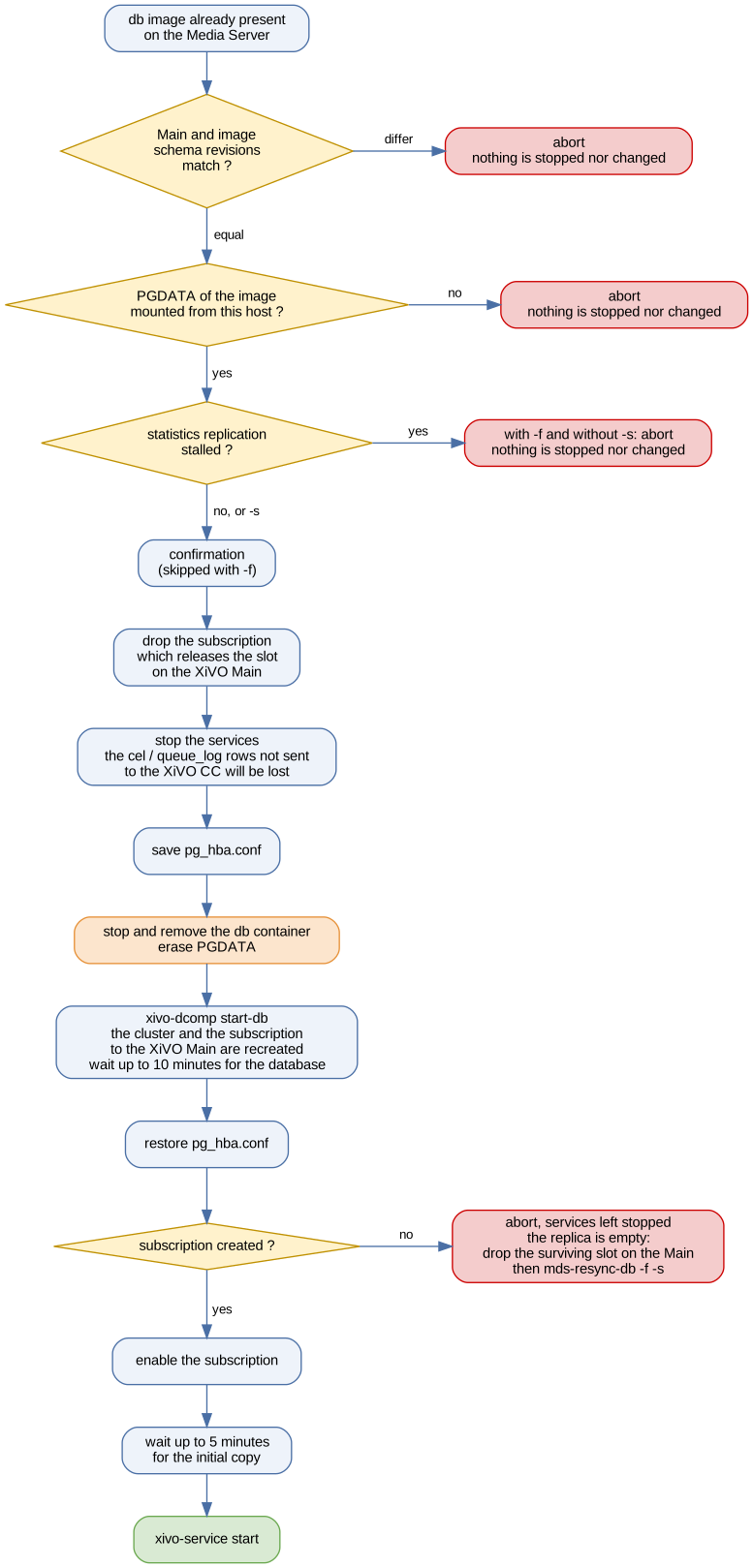
Steps of mds-resync-db
Options:
-f: skip the upgrade order check and the confirmation. Only needed when the schema revision of the XiVO Main cannot be read, for instance when the Media Server database has no subscription anymore. Check by hand that the XiVO Main and the Media Server run the same version first.-s: go on even if the statistics replication to the XiVO CC is stalled, see Statistics Replication Check.-h: print usage.
Warning
mds-resync-db erases the PostgreSQL data directory of the Media Server. The local
call_log table and the cel and queue_log rows not sent to the XiVO CC yet are lost.
Troubleshooting
The XiVO Main Upgrade Aborts on a Replication Slot
xivo-upgrade retries the detachment ten times, then aborts and lists the slots it could not
drop. A slot survives when a Media Server reconnects to it faster than it is dropped. Stop the
services on the Media Servers still consuming these slots:
mds:~$ xivo-service stop all
then re-run xivo-upgrade on the XiVO Main.
The slots dropped before the abort stay dropped: some Media Servers may already be detached, and
xivo-upgrade warns about it. Re-running xivo-upgrade detaches the others; if you give up the
upgrade instead, run mds-resync-db on each detached Media Server.
The XiVO Main Upgrade Stops After the Detachment
When xivo-upgrade stops once the replication is detached, it warns that the Media Servers stay
detached. They keep serving calls on a frozen replica. Fix the reported problem and re-run
xivo-upgrade. To give up the upgrade instead, run mds-resync-db on each Media Server to
reattach it to the XiVO Main.
The Upgrade Reports a Stalled Statistics Replication
Some statistics have not been sent to the XiVO CC for more than 15 minutes, or could not be
checked. Check that the XiVO CC is running, then the db_replic service and its logs in
/var/log/xivo-db-replication. Once the replication works again, the rows are sent and the
warning disappears.
When the Media Server database is about to be rebuilt and the statistics cannot be recovered, run
the upgrade again with -f -s to go on anyway: the rows not sent yet are lost.
The Media Server Upgrade Reports That the XiVO Main Was Not Upgraded
The schema revision of the XiVO Main does not match the one of the new database image, see
Upgrade Order Guard. Upgrade the XiVO Main and the XiVO CC first, then run
mds-upgrade again on the Media Server.
A similar error is displayed when the revision of the XiVO Main cannot be read at all: the XiVO Main
is down, or the Media Server database has no subscription anymore, after a failed rebuild. Check
that the XiVO Main is running. When the subscription is missing, check by hand that the XiVO Main
and the Media Server run the same version, then run mds-resync-db -f -s: the database is down
after a failed rebuild, so the statistics check cannot run either.
The Database Was Rebuilt but No Subscription Was Created
The replica is empty and stays empty: the Media Server must not be put back in service as is, so
mds-upgrade and mds-resync-db leave its services stopped. The usual cause is a replication
slot left behind on the XiVO Main, since creating the subscription also creates a slot of the same
name and fails when it already exists.
On the XiVO Main, list the surviving slots:
xivo:~$ sudo -u postgres psql -c "SELECT slot_name FROM pg_replication_slots;"
drop the one named after this Media Server:
xivo:~$ sudo -u postgres psql -c "SELECT pg_drop_replication_slot('main_<MDS_NAME>');"
then run mds-resync-db -f -s on the Media Server. The -f option is needed since the
database has no subscription to read the revision of the XiVO Main through, and -s since it is
down and its statistics cannot be checked.
The Initial Copy Is Still Running After the Upgrade
mds-upgrade and mds-resync-db warn when the copy is not finished after 5 minutes and start
the services anyway.
Follow the copy on the Media Server with:
mds:~$ psql -U postgres -d asterisk \
   -c "SELECT COUNT(*) FROM pg_subscription_rel WHERE srsubstate <> 'r';"
Once no row is left, regenerate the asterisk configuration:
mds:~$ /usr/share/mds-upgrade/post-start.d/80-reload-asterisk-configuration