Recording
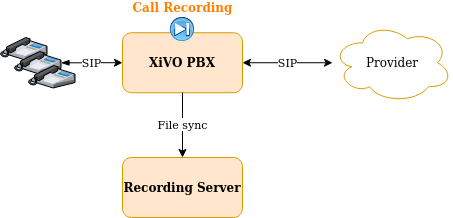
This page describes how to configure the recording feature on the XiVO PBX.
Important
Recording can also be activated on the XiVO Gateway. For this, you need to follow the Recording on Gateway guide. Beware that you cannot use both.
Recording Configuration
To configure recording there are two steps to follow on XiVO PBX:
Add link towards Recording Server,
and then enable recording, which can be done either:
in the Queue configuration
or via subroutines
1. Add link towards Recording Server
Note
Steps to be done on XiVO PBX
The first step is to configure the link towards the Recording Server by running the configuration script:
xivocc-recording-config <RECORDING_SERVER_HOST> <IPBX_NAME>
The parameters are:
Note
if one parameter is missing the script will ask them.
the Recording Server FQDN or IP (e.g. 192.168.0.2)
the XiVO PBX name (any space or dash (
-) character will be removed)Important
When configuring more than one XiVO PBX on the same Recording Server, give a different name to each of them.
After having configured the recording, you have to enable it in the Queue’s configuration or via sub-routines. See below.
2. Enable recording
Warning
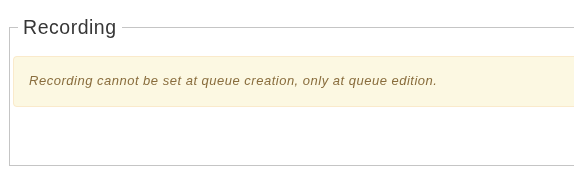
At this time recording cannot be set at queue creation, only at queue edition.
Enable recording in the Queue configuration
Note
Steps to be done on XiVO PBX
To enable recording on a queue, go to and edit the queue. Then, in the recording section, select your recording mode:
Recorded:
The calls will start recorded.
To enhance GDPR compliance, recorded queues can be set to avoid recording more than a specific percentage of calls. If recording a call would go beyond this limit, the call will start its recording paused (the agent can enable it manually if it’s important). Set the slider to 100% to record every calls.

Recorded on demand: The call always starts with its recording in paused state and can be started by the agent (see agent recording configuration)
Activate toggles this mode on and off (allowing to move to Not recorded temporarily).

Not recorded: no call will be recorded and the recording option wont be visible for the agent.

Enable recording via subroutines
Note
Steps to be done on XiVO PBX
To enable the recording you have to configure one of the shipped subroutines.
The package xivocc-recording (see recording installation section) ships the following dialplan subroutines :
Subroutine |
Description |
|---|---|
|
Records incoming calls |
|
Records incoming calls, but record starts in paused state and can be activated by the agent (see agent recording configuration) |
|
Records outgoing calls |
|
Records outgoing calls, but record starts in paused state and can be activated by the agent (see agent recording configuration) |
These subroutines are to be configured on the following XiVO PBX objects (either globally or per-object):
Warning
They MUST be configured only on the following objects. Other configuration are not supported.
Incalls,
and/or Users,
and/or Outcall
Note
Here is an example if you want to enable recording for:
All outbound calls but started in pause state,
And only on incoming call 0123456789
Then you would have to:
Create a
custom_global_subr.conffile in the/etc/asterisk/extensions_extra.ddirectoryIf not already defined elsewhere define the global subroutine:
[xivo-subrgbl-outcall]
exten = s,1,NoOp(=== Recording outbound calls in pause ===)
same = n,Gosub(xivocc-outcall-recording-paused,s,1)
same = n,Return()
Enable the call recording for incall 0123456789 by editing it via the XiVO PBX web interface and set the field to
xivocc-incall-recording
Recording Features
Automatic Stop/Start Recording On Queues
By default recording is stopped when a call is transferred to a queues in Not Recorded mode (see the feature description: Automatic Stop/Start Recording On Queues).
This can be deactivated by adding ENABLE_RECORDING_RULES environment variable to the xuc section of your docker-xivocc.yml file:
xuc:
  image: ...

  environment:
  - ...
  - SECURED_KRB5_PRINCIPAL
  - ENABLE_RECORDING_RULES
and ENABLE_RECORDING_RULES=false value to your custom.env.
XIVO_HOST=192.168.1.1
XUC_HOST=192.168.1.2
XUC_PORT=8090
...
ENABLE_RECORDING_RULES=false
and then relaunch the xivocc services with xivocc-dcomp up -d command.
Stop recording upon external transfer
By default recording is stopped when both parties of the call are external (see the feature description: Automatic Stop Recording Upon External Transfer).
This can be deactivated by adding STOP_RECORDING_UPON_EXTERNAL_XFER environment variable to the xuc section of your docker-xivocc.yml file:
xuc:
  image: ...

  environment:
  - ...
  - SECURED_KRB5_PRINCIPAL
  - STOP_RECORDING_UPON_EXTERNAL_XFER
and STOP_RECORDING_UPON_EXTERNAL_XFER=false value to your custom.env.
XIVO_HOST=192.168.1.1
XUC_HOST=192.168.1.2
XUC_PORT=8090
...
STOP_RECORDING_UPON_EXTERNAL_XFER=false
and then relaunch the xivocc services with xivocc-dcomp up -d command.
Manual purge of recording
Recording files are automatically deleted after the configured time (set during installation, see Installation).
However you can mark a recording to be deleted before the configured expiration time by attaching a specific data to the call you want to remove the recording. To do this, use the Attach call data API with the following body:
key:
xivo_recording_expirationvalue: a datetime formatted as
yyyy-MM-dd HH:mm:ss
Recording filtering configuration
Note
Steps to be done on XiVO CC
After having followed above paragraphs, you can also configure the recording filtering.
Add a user with Administrateur rights for Recording Server:
Connect to the Config Management interface : http://<XIVO_CC_IP>/configmgt (login avencall/superpass),
Add one of the XiVO PBX user giving him Administrateur rights,
Configure excluded numbers on Recording Server
Then, connect with this user to the Recording Server interface : http://<XIVO_CC_IP>/recording
Navigate to the page
Contrôle d'enregistrementand add the numbers to be excluded from the recording.
In list declare the:
XiVO Incalls numbers,
XiVO Queues numbers,
or XiVO Users numbers
to be excluded from the recording on incoming or internal call. These numbers will be checked by the xivocc-incall-recording subroutines.
Note
numbers must be entered as they first appear in dialplan (check is made against XIVO_DSTNUM dialplan variable).
In list declare the:
XiVO Users internal numbers
to be excluded from recording on outgoing calls. These numbers will be checked by the xivocc-outcall-recording subroutines.
Note
check is made against XIVO_SRCNUM dialplan variable.