Requirements and Compatibility
Compatibility
Android
The tests are performed from Android 12. Even if compability is set Android from 11, previous versions are not supported. The application lifecycle is following Android 3 years LTS support Minimal phone requirements to find the application on store are:
Shipped after 2020
RAM >= 2Gb
iOS
The tests are performed from devices compatible with at least iOS 13. Previous versions are not supported.
Limitations
No video call between users. Meeting room videoconferences can be joined from the application, but they open in the device’s web browser (see Meeting rooms)
No agent account
No OIDC, CAS or Kerberos authentication, only basic or LDAP
No Wifi ↔ GSM network handover: an active call is interrupted if the device switches between Wifi and cellular (4G/5G). The user must redial manually.
No seamless Wifi roaming: switching between Wifi access points during a call may interrupt it. This is not a DECT environment — Wifi cell mobility is the responsibility of the underlying network infrastructure, not XiVO.
Case of unlisted terminals
Warning
Manufacturer’s software layer may create unattended behavior on unsupported devices. Please open a ticket to describe device - with OS version and the bug.
It is imperative to make preliminary tests on the mobiles which would not be compatible. Be aware that some manufacturers are not keen with push notifications, and can cause issues for receiving VOIP calls. You can find more information about it here
If you encounter problems, you can send an email to the support directly via the mobile application. It is however important to have configured on your mobile an application to send emails. The logs of the mobile application are sent in an attached file in this email.
You can also send logs to your email directly for own debugging.
Push Notifications
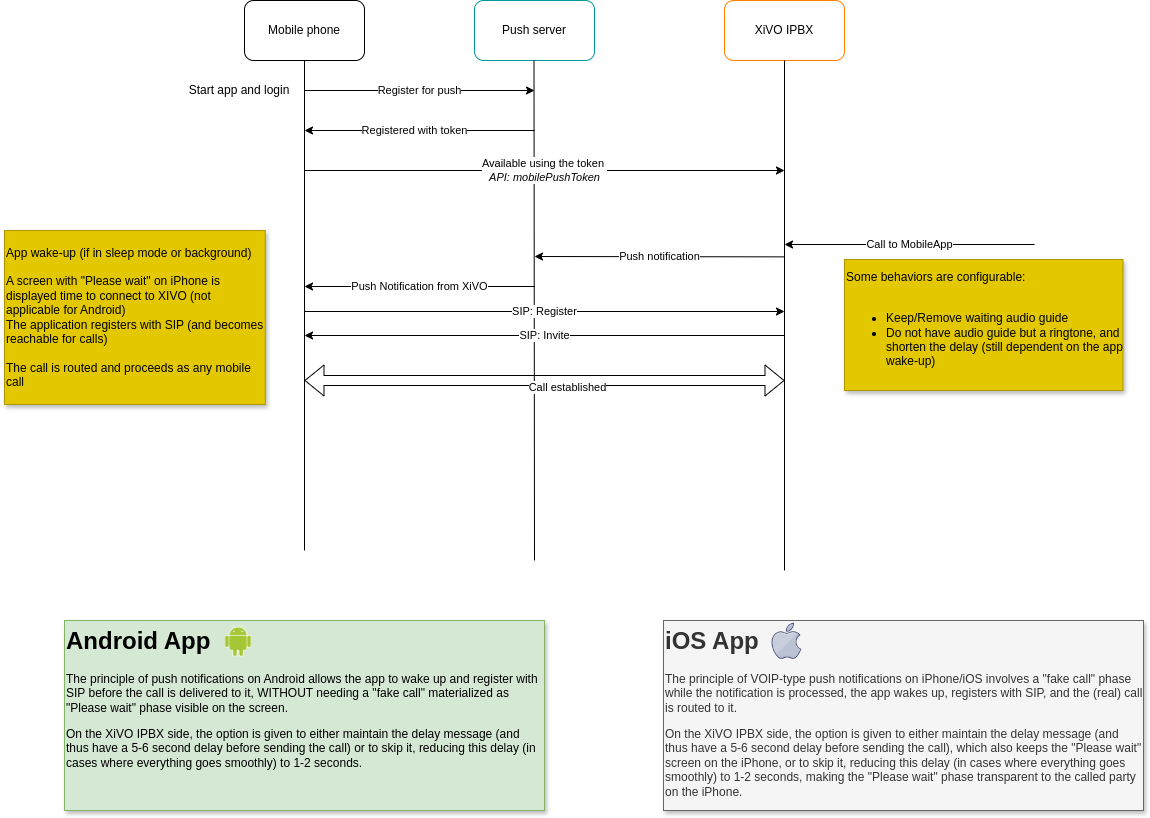
Push notification is a technology used in the XiVO server and the mobile application.
When the user receives an incoming call, we use Firebase to wake up the mobile application by sending a push notification for Android devices and uses APNS (Apple Push Notification Server) for iOS devices.
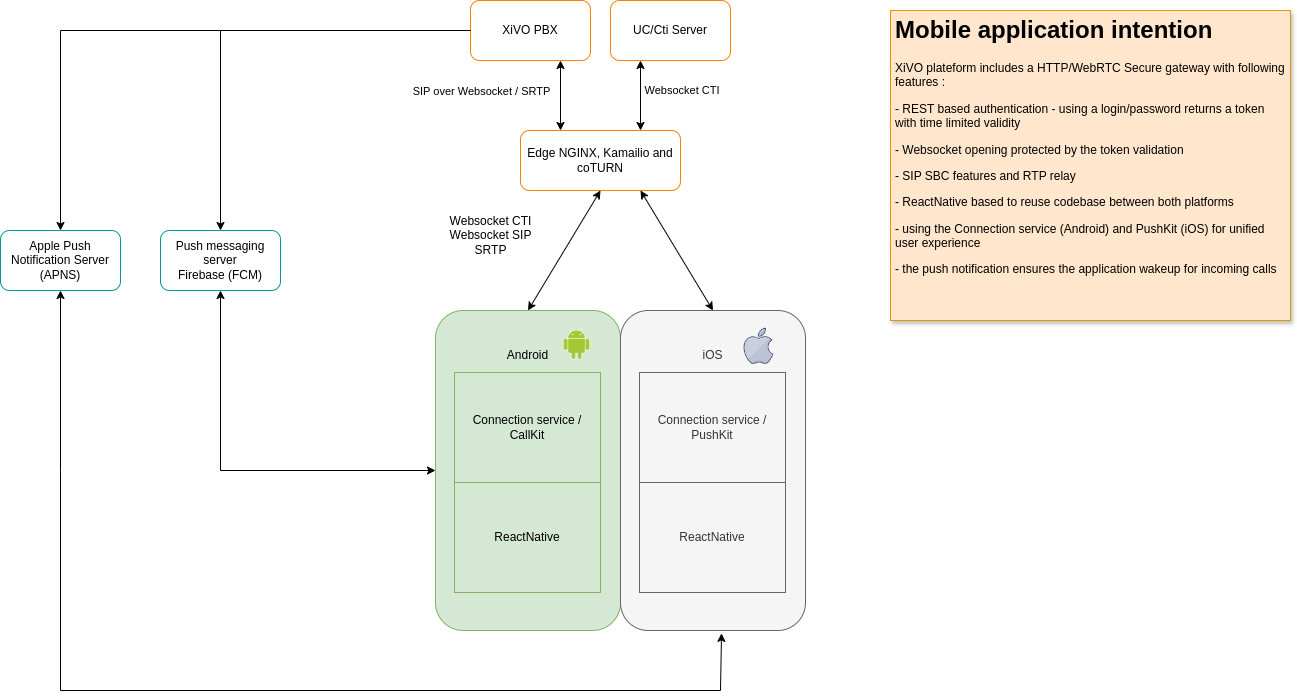
The official firebase documentation describes the required ports and firewall configuration. See https://firebase.google.com/docs/cloud-messaging/concept-options#messaging-ports-and-your-firewall
Apple documentation describes the required ports and firewall configuration. https://support.apple.com/en-la/102266
You can ring multiple devices at the same time. When you choose to ring the mobile application and the UCAssistant, the system will know when the devices are both ready to receive the incoming call.
As the UC assistant is connected directly to the server via the web interface, this will be relatively quick.
For the mobile application, the operating systems (Android and IOS) are using a “DOZE” mode. This mode closes the application when it has not been used for some time, to reduce the consumption of the battery. To wake up the application, we use push notification that goes through a public push server either from Google or Apple to wake up the XiVO mobile application.
You might need to wait a certain time after you launched the call for the mobile application to wake up. This time can vary from one to ten seconds, depending on the push servers and the network quality. Once the mobile application responds, we start ringing the available devices.
Some use cases
Ringing device selected:
UC Assistant: Fast ringing on the UC direct connection to the web browser or desktop
Mobile application: Launching the ringtone on the mobile application when it will be awakened. The mode of operation used is the push notification. There can be a waiting time.
UC + Mobile Application: There is a delay before launching the ringtone on both devices, the time for the mobile application to wake up.