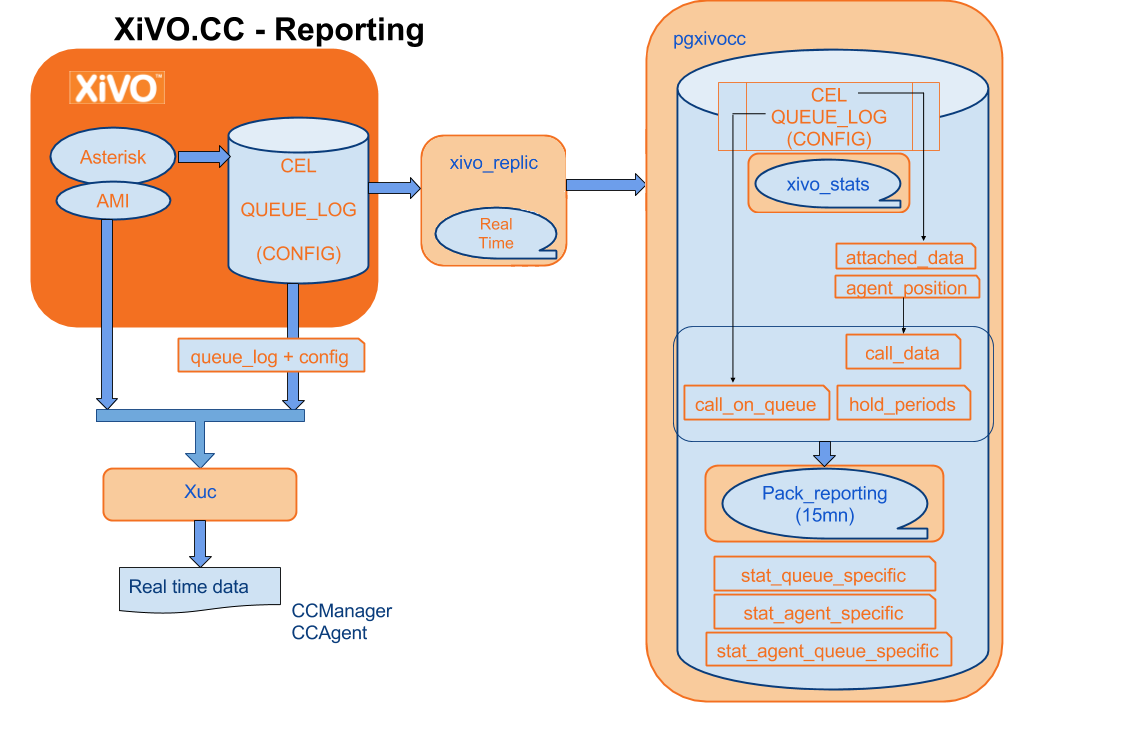
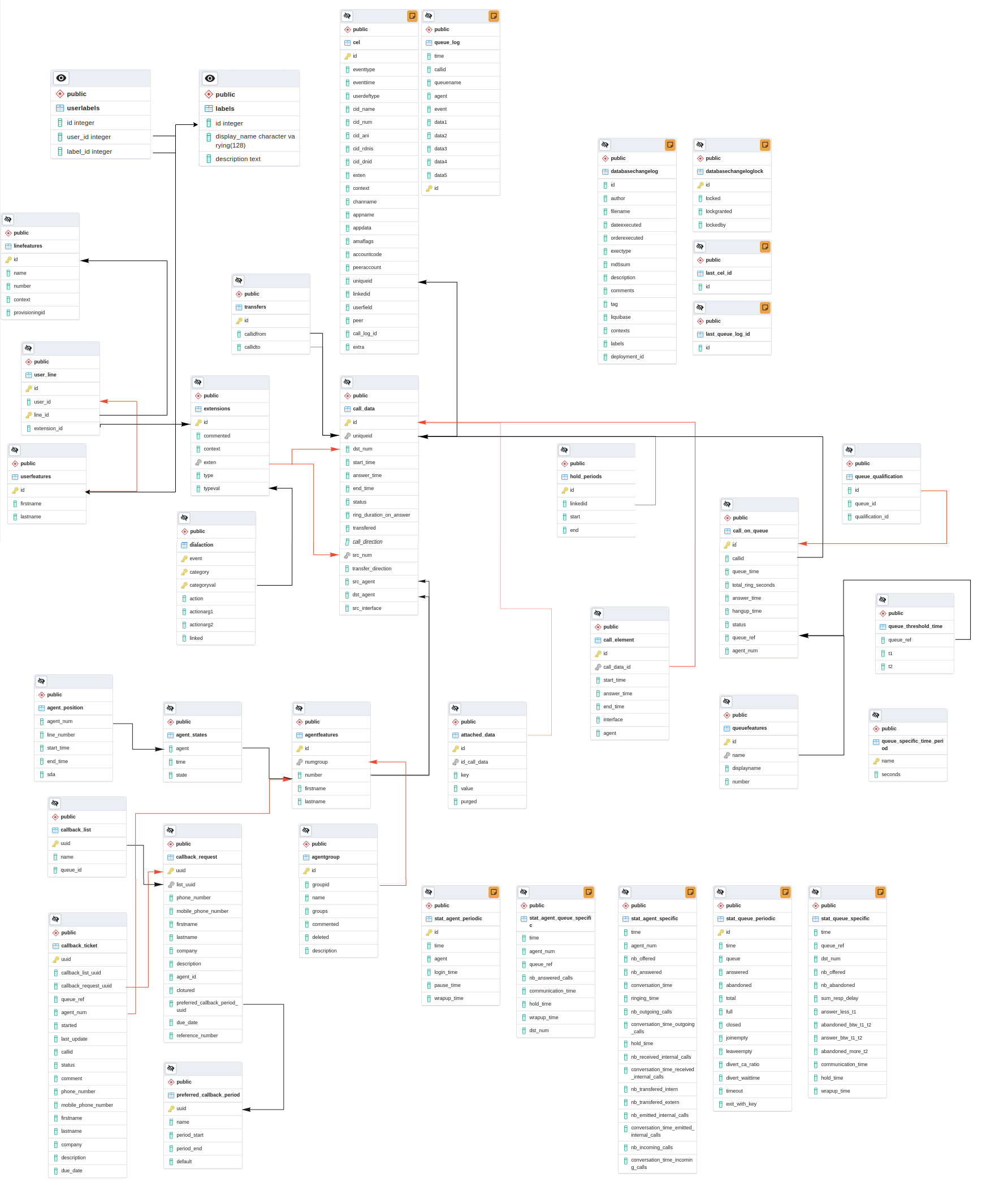
Pack reporting is a part of the XivoCC. It aims at computing historical statistics,
which are stored in the xivo_stats database. Sample reports based on them are accessible in SpagoBI.
Important
New tables in xivo_stats schema are available (prefixed with xc_). These tables are (so far) for internal use and can be changed without notice. Documentation will be available once this new statistic model will replace the existing one and fix the existing limitations of previous model described above.
The reporting is composed of four packages: pack-reporting, xivo-full-stats, xivo-reporting-db and xivo-db replication.
These packages will feed the tables of the xivo_stats database:
xivo-db-replication feeds the tables cel and queue_log in real time, and the configuration tables (dialaction, linefeatures, etc…) every 5 minutes
xivo-full-stats feeds in real time the tables call_on_queue, call_data, stat_queue_periodic, stat_agent_periodic and agent_position
xivo-reporting-db and pack-reporting work together to feed the tables stat_queue_specific, stat_agent_queue_specific and stat_agent_specific every 15 minutes
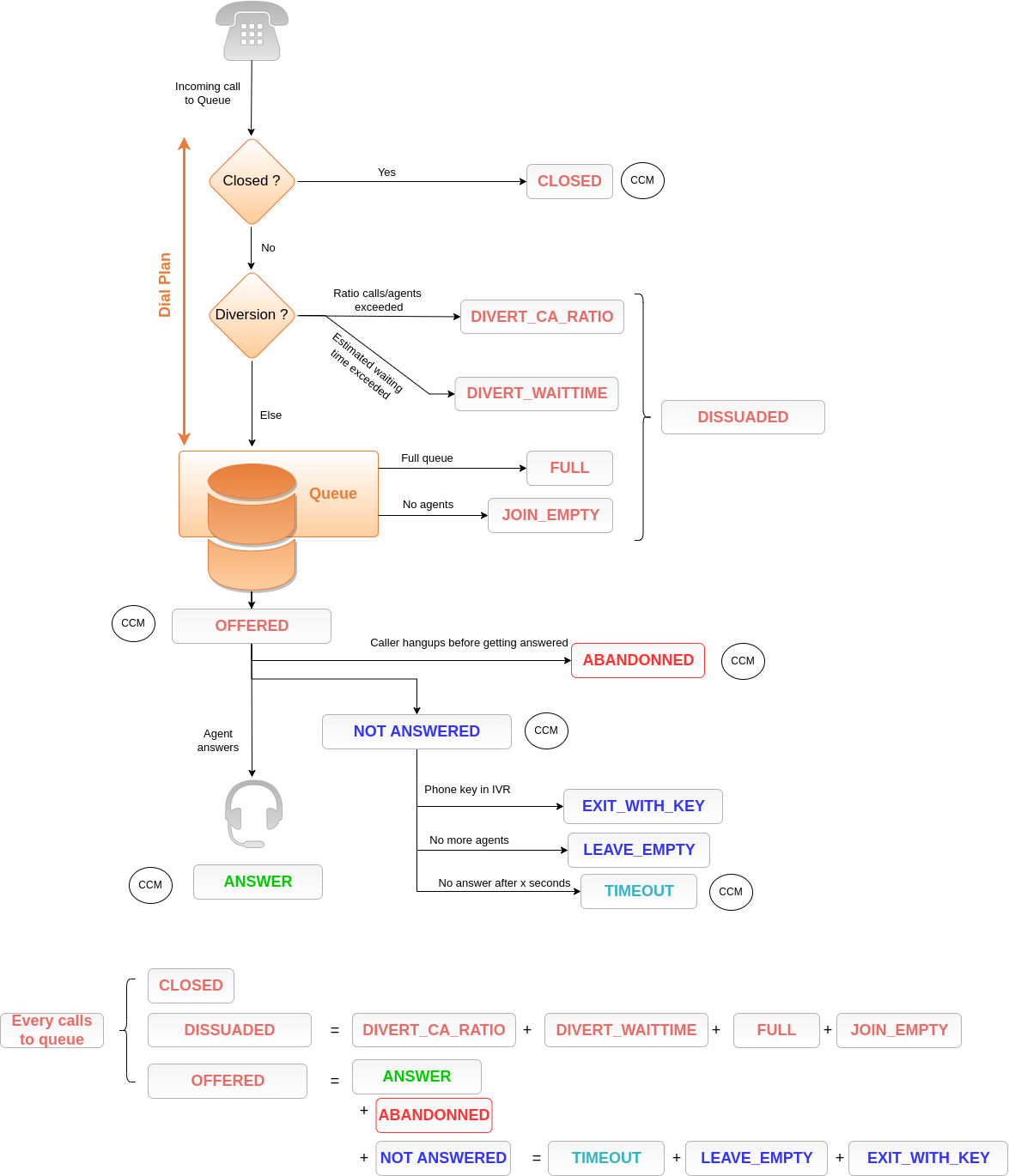
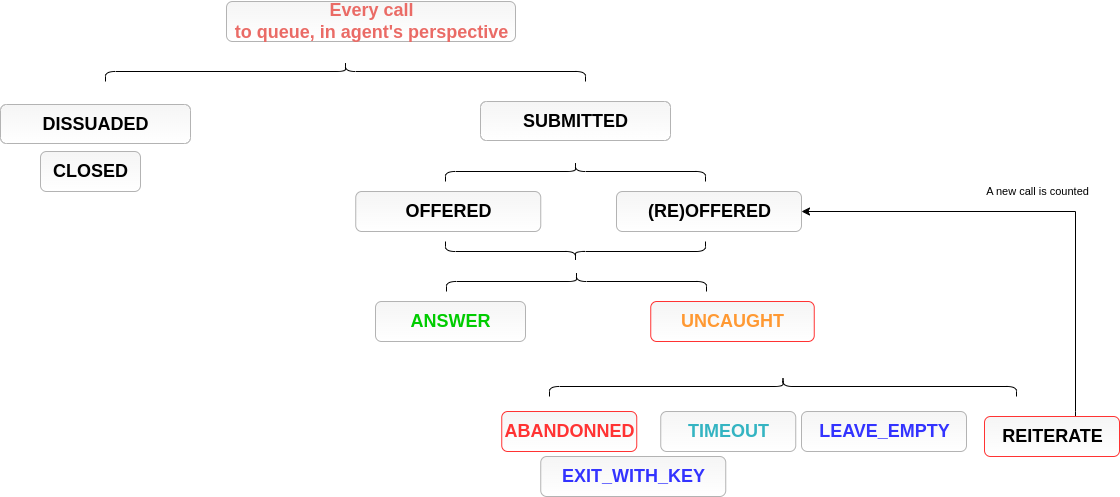
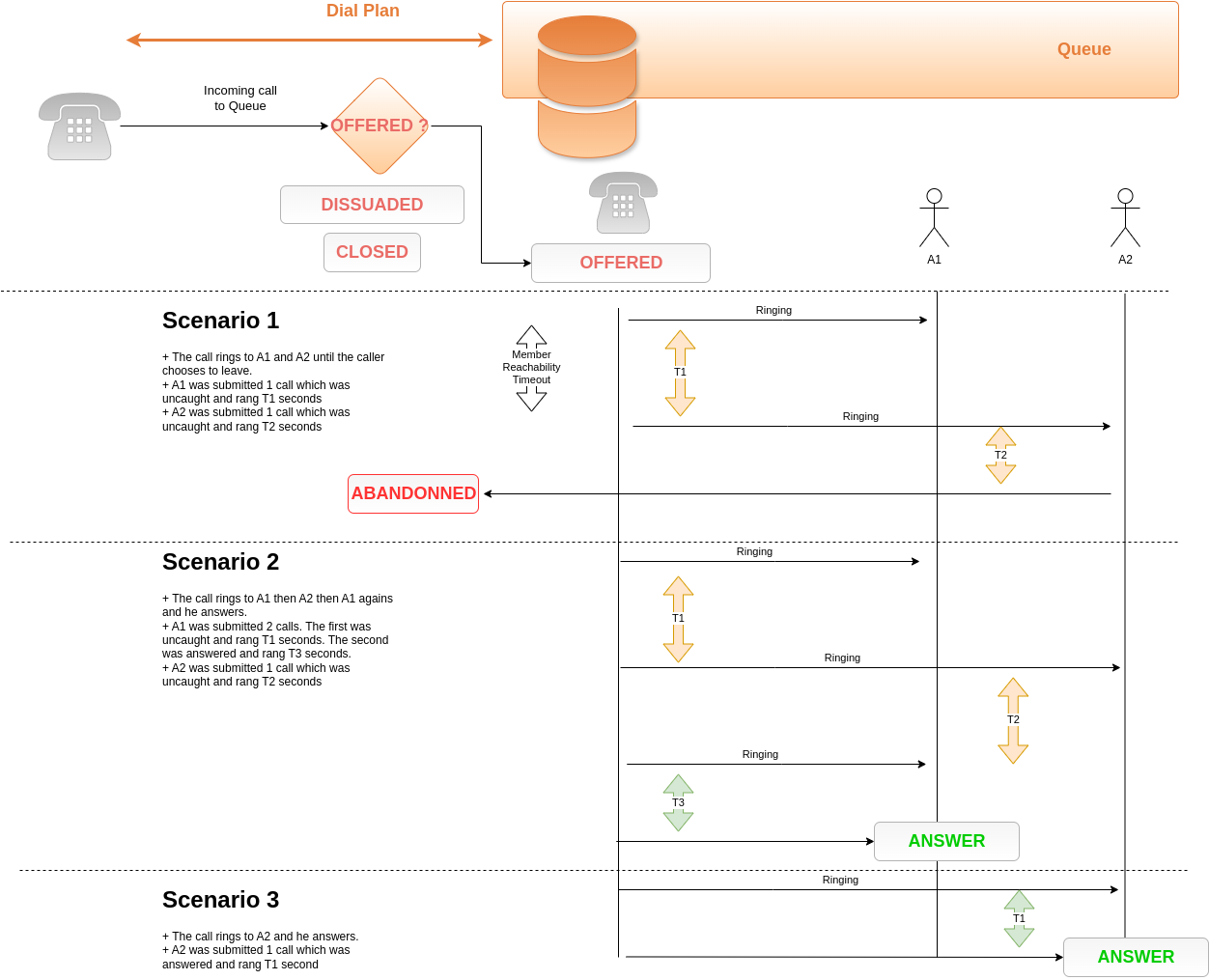
A call may be submitted to an agent several times. Thus a call ‘not answered’ by an agent may still be answered by another.
This may be more explicit through an example below.
Queue members should only be agents. If users are members of a queue, their statistics will be incomplete.
Configuration modifications on the XiVO (such as an agent deletion) are replicated on the statistics server, and their previous value is not kept.
However, statistics history is preserved.
Calls longer than 4 hours are considered as unterminated calls and therefore communication time is set to 0 for these calls.
If two agents are associated to the same call, they will have the same hold time for this call.
Transfer statistics limitations in call_data table:
Given two queues Q1 and Q2, two agents A1 and A2, and an external caller C.
C calls Q1 and A1 answers
A1 transfers to Q2 and A2 answers
A2 transfers to the outside
Then the second transfer is seen as a transfer to the outside.
Given one queue Q1, Two agents A1 and A2 and an external caller C.
C calls Q1 and A1 answers
A1 transfers to A2 through internal phone number
A1 completes the transfer
Then the call between A2 and C is not computed at all in statistics.
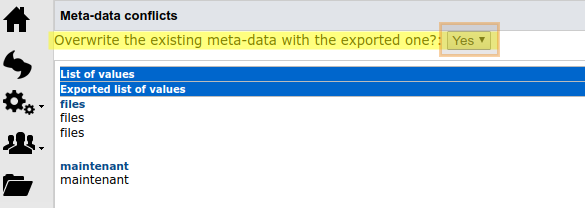
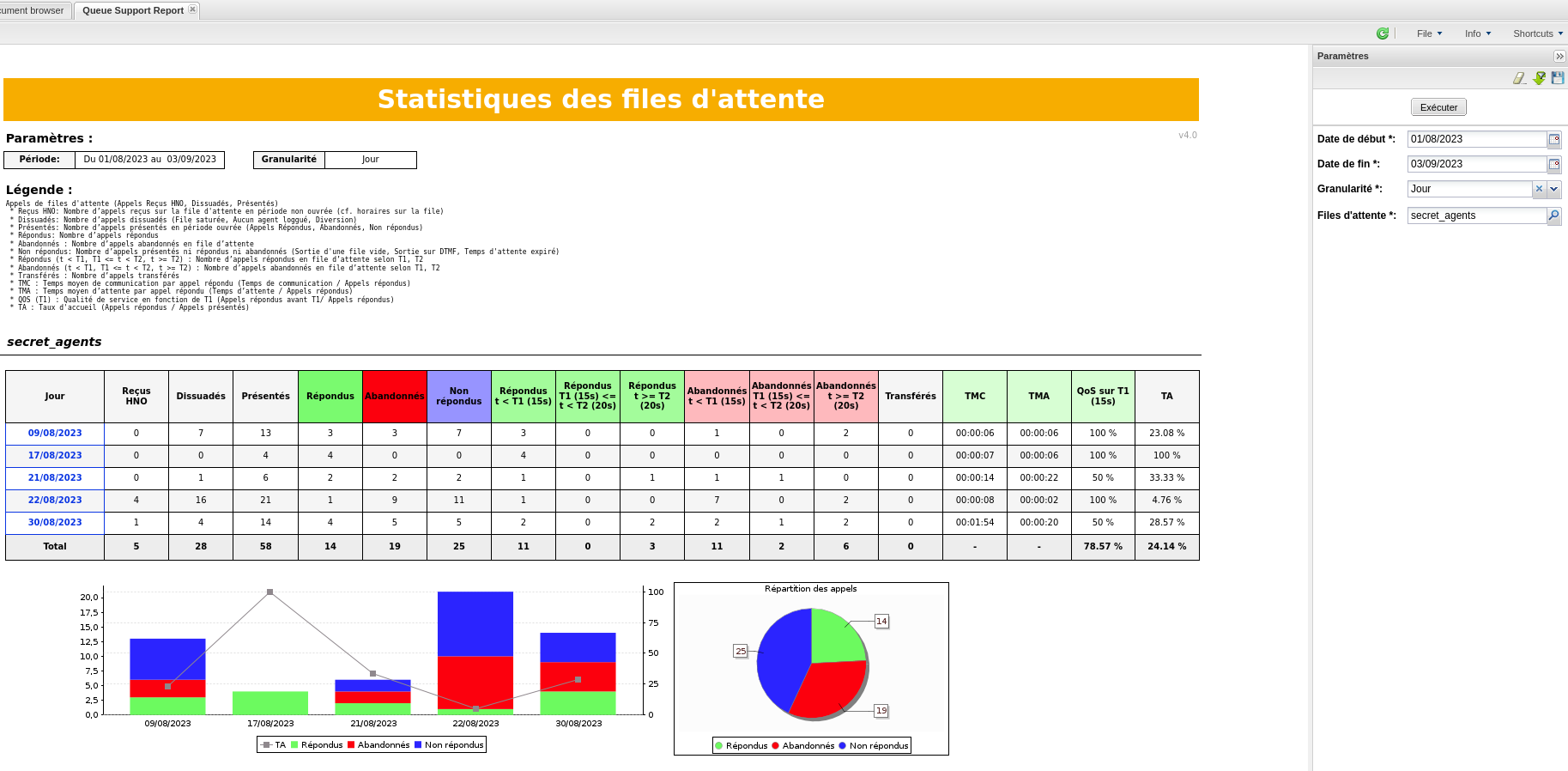
All report samples (see Upload Statistics Reports) bundled with XiVOCC are aimed to work with french date format.
By default dates are picked in french format (day/month/year). Either you need to type them explicitly in your locale format
either you can set Locale to french thanks to Flag menu in Spago. See #1662
Statistics computed in real time are available in the ccmanager (see Queue view).
Warning
Because the SpagoBI technology is growing old and does not receive open-source updates, we won’t build our SpagoBI image after the one from Maia: 2024.05.latest.
That image will still work just as before for further releases, starting with Naos.
Configure SpagoBI on http://XIVOCC_IP/SpagoBI (by default login: biadmin, password: biadmin).
Replace XIVOCC_IP by the CC VM’s IP or the FQDN.
Due to a SpagoBi limitation, when scheduling reports using string parameters, you need to enter manualy the parameter using comma and quotes to
separate values.
Example for queues support, technical and sales, the parameters of the schedulers
must be filled as follow:
Each line in call_data, correspond to a unique call and contains only one uniqueId of one call leg.
This table is aggregated in near real time with the data of cel Asterisk table.
Important
End of a call is considered when phone is hung up, we don’t consider the time of transfers that can be done besides initial call.
Column
Type
Description
id
INTEGER
uniqueid
VARCHAR
Call unique reference, generated by Asterisk
dst_num
VARCHAR
Called number
start_time
TIMESTAMP
Call start time
answer_time
TIMESTAMP
Call answer time
end_time
TIMESTAMP
Call end time (phone is hung up)
status
status_type
Call status. Beware: only answered is properly filled.
ring_duration_on_answer
INTEGER
Ring time of the endpoint answering the call, in seconds
transfered
BOOLEAN
True if the call has been transfered
call_direction
call_direction_type
Call direction (‘’incoming’’ : call from the outside, received by XiVO ; ‘’outgoing’’ : call to the outside, originated by an endpoint associated to XiVO ; ‘’internal’’ : call taking place entirely inside the XiVO)
src_num
VARCHAR
Calling number
transfer_direction
call_direction_type
Indicates the transfer direction, if relevant
src_agent
VARCHAR
Agent originating the call
dst_agent
VARCHAR
Agent receiving the call, if it is a direct call on an agent. Not filled when the call is destined to a queue
src_interface
VARCHAR
Interface originating the call (in the Asterisk sense, ex : SIP/01234)
The reporting allows to attach as much data as wished to a given call, in order to find them in the reporting database for future use.
This data must be in the form of a set of key-value pairs.
To attach data to a call, you must use the dialplan’s CELGenUserEvent application:
Total ring time, in seconds (includes ringing of non-answered calls)
answer_time
TIMESTAMP
Answer time
hangup_time
TIMESTAMP
Hangup time
status
call_exit_type
Call status (full: full queue; closed: closed queue; joinempty: call arrived on empty queue; leaveempty : exit when queue becomes empty; divert_ca_ratio : call redirected because the ratio waiting calls/agents was exceeded ; divert_waittime: call redirected because estimated waiting time was exceeded; answered: call answered ; abandoned: call abandoned; timeout : maximum waiting time exceeded)
Statistics aggregated by queue, called number and time interval (15 minutes)
Column
Type
Description
time
TIMESTAMP
Start time of the considered interval
queue_ref
VARCHAR
Technical name of the queue
dst_num
VARCHAR
Called number
nb_offered
INTEGER
Number of presented calls
nb_abandoned
INTEGER
Number of abandoned calls
sum_resp_delay
INTEGER
Wait time, in seconds
answer_less_t1
INTEGER
Number of calls answered in less than t1 seconds
abandoned_btw_t1_t2
INTEGER
Number of calls abandoned between t1 and t2 seconds
answer_btw_t1_t2
INTEGER
Number of calls answered between t1 and t2 seconds
abandoned_more_t2
INTEGER
Number of calls answered in more than t2 seconds
communication_time
INTEGER
Total communication time in seconds
hold_time
INTEGER
Total hold time in seconds
wrapup_time
INTEGER
Total wrap-up time in seconds
The thresholds t1 and t2 are configurable:
in the table queue_specific_time_period for the default values in seconds. Installation values are t1=15 seconds and t2=20 seconds.
Data is saved in the form of (name, seconds) pairs, for example : (‘t1’, 15).
in the table queue_threshold_time for values specific to a queue. Data is saved in the form of a tuple (queue name, t1, t2).
Tables call_data, call_on_queue and hold_periods can be linked together by doing a join on a column holding the call reference.
The columns are the following:
Table
Reference column
call_data
uniqueid
call_on_queue
callid
hold_periods
linkedid
On the other hand, tables attached_data and call_element contains foreign key referencing the id column of call_data.
—
Tables call_on_queue, agentfeatures and agent_position can be linked together by doing a join on a column holding the agent number reference.
The columns are the following:
Table
Reference column
call_on_queue
agent_num
agentfeatures
number
agent_position
agent_num
—
Tables agentgroups and agentfeatures can be linked together by doing a join on a column holding the agent group id reference.
The columns are the following:
Table
Reference column
agentfeatures
numgroup
agentgroups
id
—
Tables transfers and call_data can be linked together by doing a join on a column holding the call uniqueid reference.
The columns are the following:
Let’s take the assumption that one Agent (A1 with id 8000 and phone number 1000) calls an internal User ( U1 with phone number 1001 ).
This call is transfered to Agent A2 (with id 8002 ) blindly. Then A1 calls internal another User ( U2 with phone number 1002 )
This call flow generates in call_data 2 lines (simplified table to keep only important fields) one for each call ( U1 and U2 ):
id
uniqueId
dst_num
answer_time
end_time
src_agent
dst_agent
transfered
transfer_direction
1
12345678.9
1001
2018-12-01 15:02:00
2018-12-01 15:12:00
8000
8002
true
internal
2
12345679.0
1002
2018-12-01 15:13:00
2018-12-01 15:23:00
8000
and get in transfers 1 line (where callidto id the uniqueId of the leg of Agent A2 with user U1):
id
callidfrom
callidto
1
12345678.9
98765432.1
Statistics (done by pack-reporting for spago reports) generates then stat_agent_specific:
time
agent_num
nb_emitted_internal_calls
conversation_time_emitted_internal_calls
hold_time
2018-11-29 15:15:00
8000
1
720
0
2018-11-29 15:30:00
8000
1
480
0
Important
We don’t consider the time of the transfer besides initial call and only time of established calls.
Let’s take the assumption that one Agent (A1 with id 8000 and phone number 1000) calls an internal User ( U1 with phone number 1001 ).
This call is transfered to Agent A2 (with id 8002 ) after talking with him. Finally A1 calls internal another User ( U2 with phone number 1002 )
This call flow generates in call_data 3 lines (simplified table to keep only important fields) one for each call between U1 and U2 and one for A2:
id
uniqueId
dst_num
answer_time
end_time
src_agent
dst_agent
transfered
transfer_direction
1
12345678.9
1001
2018-12-01 15:02:00
2018-12-01 15:12:00
8000
8002
true
internal
2
12345679.0
1002
2018-12-01 15:13:00
2018-12-01 15:23:00
8000
and get in transfers 1 line (where callidto id the uniqueId of the leg of Agent A2 with user U1):
id
callidfrom
callidto
1
12345678.9
98765432.1
also get in hold_period 1 line:
id
linkedId
start
end
1
12345678.9
2018-12-01 15:07:00
2018-12-01 15:12:00
Statistics (done by pack-reporting for spago reports) generates then stat_agent_specific:
time
agent_num
nb_emitted_internal_calls
conversation_time_emitted_internal_calls
hold_time
2018-11-29 15:15:00
8000
1
1020
300
2018-11-29 15:30:00
8000
1
480
0
Important
Conversation time can be over 900s (15mn) as hold time is included in this specific call flow.
This query get the phone set number on which the agent took the call.
It lists all calls answered by agent with line number on which he was logged in.
The query here is limiting to all calls answered the first day of August, but it can be easily customized to your needs.